


WordPix - Guess Word Picture
4.6549.00 Reviews
App Specs
- Version
- 4.5.0
- Updated On
- License
- Free
- Downloads
- 1,000,000+
- Developer
- HYPERCELL
- Categories
- Trivia
- Platform
- Android, iOS
Screenshots


 Analysis by AppCompare
I tend to enjoy word puzzles most when they give me something to reason through rather than simply asking for a vocabulary test. WordPix-Crossword Puzzle Game has that appeal: its picture-led clues invite me to connect an image with a word and then fit the answer into a crossword. It works best as a casual thinking game, the sort I can dip into for a short break or share with someone who likes solving clues aloud.
A practical way to settle into a puzzle
My simplest approach is to look at the image first, then check the available letters and the crossing entries before committing to a guess. A picture can suggest several related words, so the crossword structure is useful evidence rather than just a place to put the answer. If one clue feels unclear, I leave it briefly and solve a more obvious entry; a crossing word can narrow the possibilities without spending a hint.
That small habit matters because visual clues can be suggestive rather than perfectly literal. I try naming what is plainly shown before jumping to a theme or association. If the image could point to an object, an action, or a broader idea, I compare each possibility with the word length and any letters already established. It turns a frustrating guess into a manageable process.
Where it fits into an ordinary day
I can see myself opening it while waiting for a meal or taking a quiet pause between tasks. The picture-and-letter format gives me a clear point of focus, but I don’t need to set aside a long stretch of time to understand what I’m doing. It also suits a relaxed back-and-forth with a friend: one person can describe what they notice in an image while the other tests possible words against the grid.
That shared style is a natural fit for a game that can be played with friends or solo. Playing alone lets me work at my own pace, while a second opinion is especially useful when two people read an image differently. I would not treat it as a serious head-to-head competition; its stronger social use is talking through a clue together, not turning every answer into a race.
Playing by pictures, letters, and logic
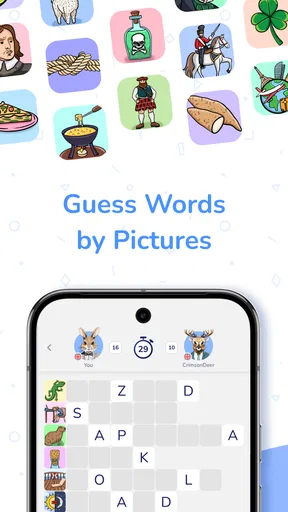
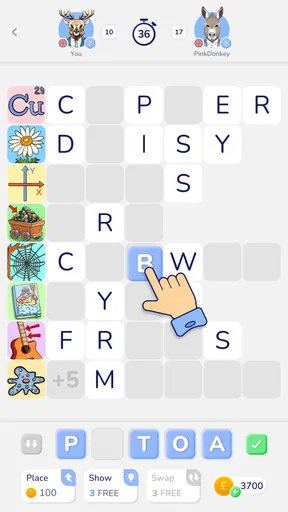
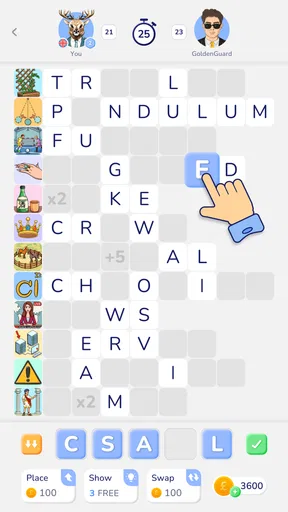
WordPix-Crossword Puzzle Game takes the classic crossword formula and spices it up with a unique twist. Instead of just words, you’re given a mix of images and letters to help solve the puzzles. The goal? Crack the crossword using visual clues. It’s like Pictionary meets crosswords, and it’s as fun as it sounds!
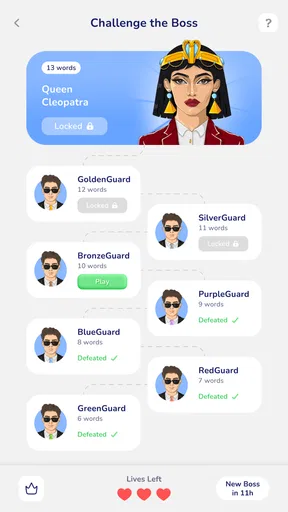
The app boasts a user-friendly interface, which means you won’t have to fumble around trying to figure out what to do. Everything is intuitive, from dragging and dropping letters to zooming in on those tiny images. Plus, the game offers a variety of levels, increasing in difficulty as you progress. So, whether you’re a newbie or a seasoned puzzle solver, there’s something here for everyone.
Worth Reading Before You Choose

Flipboard Shows What News Apps Must Do Beyond the Feed

Switching to Android Auto Means Rethinking Your Driving Routine

Google Calendar Makes a Crowded Week Easier to Manage

Ludo King Makes the Most of the Minutes Between Plans

Baby Panda World Brings Quick Play to Modern Phones, but Its Game Library Feels Busy

ESPN’s Live Game View Makes Following Close Games Easier
Settings and a comfortable pace
The graphics are crisp and colorful, making each puzzle a visual treat. The images are clear, which is super important since you’re relying on them to solve the puzzles. The background music is pretty chill too, providing a relaxing atmosphere as you work through the clues. But if you’re like me and prefer silence while concentrating, you can easily mute it.
I’d check the sound controls before settling in, particularly if I’m playing somewhere quiet or sharing a room. Muting the music makes the game easier to use as a quick, low-distraction break, while leaving it on can make a longer session feel more relaxed. I also find that adjusting how I hold the phone and taking a moment to inspect a small image is more useful than rushing through a clue that is hard to see.
Getting more from the clue system
What I love most about this game is the challenge it presents. It’s not just about knowing words; you need to make connections between images and letters, which really gets the brain cells firing. Plus, the satisfaction of completing a particularly tricky puzzle is second to none.
Another cool feature is the hint system. Stuck on a word? No worries, the hints can guide you in the right direction. But use them wisely; they’re limited, so you’ll want to save them for those real head-scratchers.
For a repeatable routine, I’d solve the clues I feel confident about first, then use the newly placed letters to revisit the uncertain images. I save a hint for a point where I have genuinely compared the likely answers and still cannot make progress. That makes help more valuable and prevents me from using it just because the first interpretation of a picture did not click.
There is a trade-off in that approach: taking time to reason things out is satisfying, but it may not suit someone who wants every puzzle to move quickly. If I am playing in a hurry, I would rather stop at a natural point than turn each ambiguous image into a prolonged debate. The game is most enjoyable when I can give the clue a little attention without feeling pressured to finish instantly.
How it compares with other word puzzles
Compared with a standard crossword, this game leans more heavily on visual interpretation. A traditional grid often rewards broad vocabulary and familiarity with clue conventions; here, the image adds another route into the answer, but it can also introduce ambiguity. Compared with a pure picture-guessing game, the crossing letters give me a useful logic check, so I am not relying on the image alone.
That blend makes it a good choice for someone who likes wordplay but does not want every clue to be a written definition. It is less suitable for a player who wants a large, conventional crossword grid, a strict timed challenge, or a game built around rapid-fire trivia. Its appeal is the slower act of connecting visual hints to words, not speed or encyclopedic recall.
Who is likely to enjoy it
I’d recommend it to casual puzzle fans, people who enjoy spotting details in pictures, and friends or family members who like solving things together without needing complicated rules. It can also be a gentle way to exercise associations and vocabulary during a short break. The Everyone age rating makes it broadly approachable, though younger players may still enjoy it most with someone who can talk through tricky clues.
I would point dedicated crossword regulars toward a more traditional option if they mainly want dense clue writing and the feel of a large newspaper-style grid. Likewise, if picture clues tend to annoy you, or if you prefer puzzles with one unambiguous definition for every answer, the central mechanic may feel like a source of friction rather than a refreshing change.
What to know before installing
HYPERCELL’s trivia game is free to download, has an average rating of 4.6 from around 31,000 ratings, and has been installed over a million times. It is rated for Everyone, with a minimum OS requirement of 7.0. The current version is 4.0.0, and it was released on April 25, 2025. Optional in-app purchases range from $0.99 to $20.99 per item, so I would check the purchase prompts carefully if I’m handing the phone to a child or trying to keep spending controlled.
Those details make it easy to decide whether it is worth trying, but the best fit still depends on how you like to play. If you want a free starting point for picture-based word puzzles, it is an accessible option. If you prefer to avoid in-app purchases altogether, pay attention to any offers that appear and do not assume that every form of help or progression is included at no cost.
Limits that shape the experience
Even though the app is a lot of fun, there are a few areas that could be better. Occasionally, the images can be a little ambiguous, leading to some frustration. Also, while the game offers a good range of puzzles, I wouldn’t mind seeing more updates with new crossword packs to keep things fresh.
The ambiguity is not just a minor inconvenience; it changes how I approach the game. I have to be willing to test more than one sensible reading of a picture, and some players may find that less fair than a written clue. When that happens, crossing letters and a carefully chosen hint can help, but they do not remove the basic uncertainty of interpreting an image.
Another practical limit is that the relaxed format is not automatically ideal for every setting. A small image may be harder to inspect when I am moving around or trying to play one-handed, and background music that feels calming at home may be unwelcome in a shared space. I get the most out of it when I can pause, look closely, and return to the clue without treating it as a quick reflex game.
My verdict after settling into its rhythm
Overall, WordPix-Crossword Puzzle Game is a delightful addition to any word game lover's collection. It's challenging yet relaxing, and the unique image-based puzzles add a refreshing twist to the typical crossword format. So, if you’re looking to put your vocabulary and visual skills to the test, give this one a download. Trust me, it’s worth it!
My recommendation comes with one clear qualification: it is best for people who enjoy interpreting clues, not just filling boxes. I would start with a few puzzles, use the crossing letters as a check, and save hints for genuine dead ends. If that routine feels satisfying, the game has a distinctive place among casual word puzzles; if unclear pictures quickly wear out your patience, a conventional crossword will probably be a better everyday companion.
Pros
- Engaging word puzzles boost vocabulary.
- Intuitive interface for easy navigation.
- Variety of levels keeps gameplay fresh.
- Offline mode available for on-the-go play.
- Colorful
- appealing graphics enhance experience.
Cons
- Ads can be distracting during gameplay.
- Limited hints may frustrate some users.
- Occasional bugs disrupt puzzle loading.
- In-app purchases can become costly.
- Challenging difficulty may deter beginners.
FAQs for WordPix - Guess Word Picture
What is WordPix-Crossword Puzzle Game about?
WordPix-Crossword Puzzle Game combines the excitement of a crossword puzzle with engaging picture clues. Players must decipher images to solve each crossword, adding a visual twist to traditional word games. This innovative approach appeals to puzzle enthusiasts looking for a fresh challenge and a fun way to enhance their vocabulary.
Is WordPix-Crossword Puzzle Game free to play?
Yes, WordPix-Crossword Puzzle Game is free to download and play. However, it offers in-app purchases that can enhance your gaming experience. These purchases might include additional hints or the option to unlock new levels, although you can still enjoy the full game without spending money.
How difficult are the puzzles in WordPix-Crossword Puzzle Game?
The game is designed to offer a range of difficulty levels, catering to both beginners and seasoned puzzle solvers. Early levels introduce basic concepts and words, while later stages present more complex challenges. This progression ensures that players can enjoy a satisfying experience as they improve their skills.
Can I play WordPix-Crossword Puzzle Game offline?
Yes, WordPix-Crossword Puzzle Game can be played offline, making it a perfect companion for travel or areas with limited internet access. While some features, like in-app purchases or updates, require a connection, the core gameplay is accessible without being online.
Are there any social features in WordPix-Crossword Puzzle Game?
WordPix-Crossword Puzzle Game includes social features that allow players to connect with friends and compare scores. You can share your achievements on social media or challenge friends to beat your high score, adding a competitive edge to the solitary puzzle-solving experience.


